Feature · Week board
Plan the team’s week in days, then let each person plan the hours.
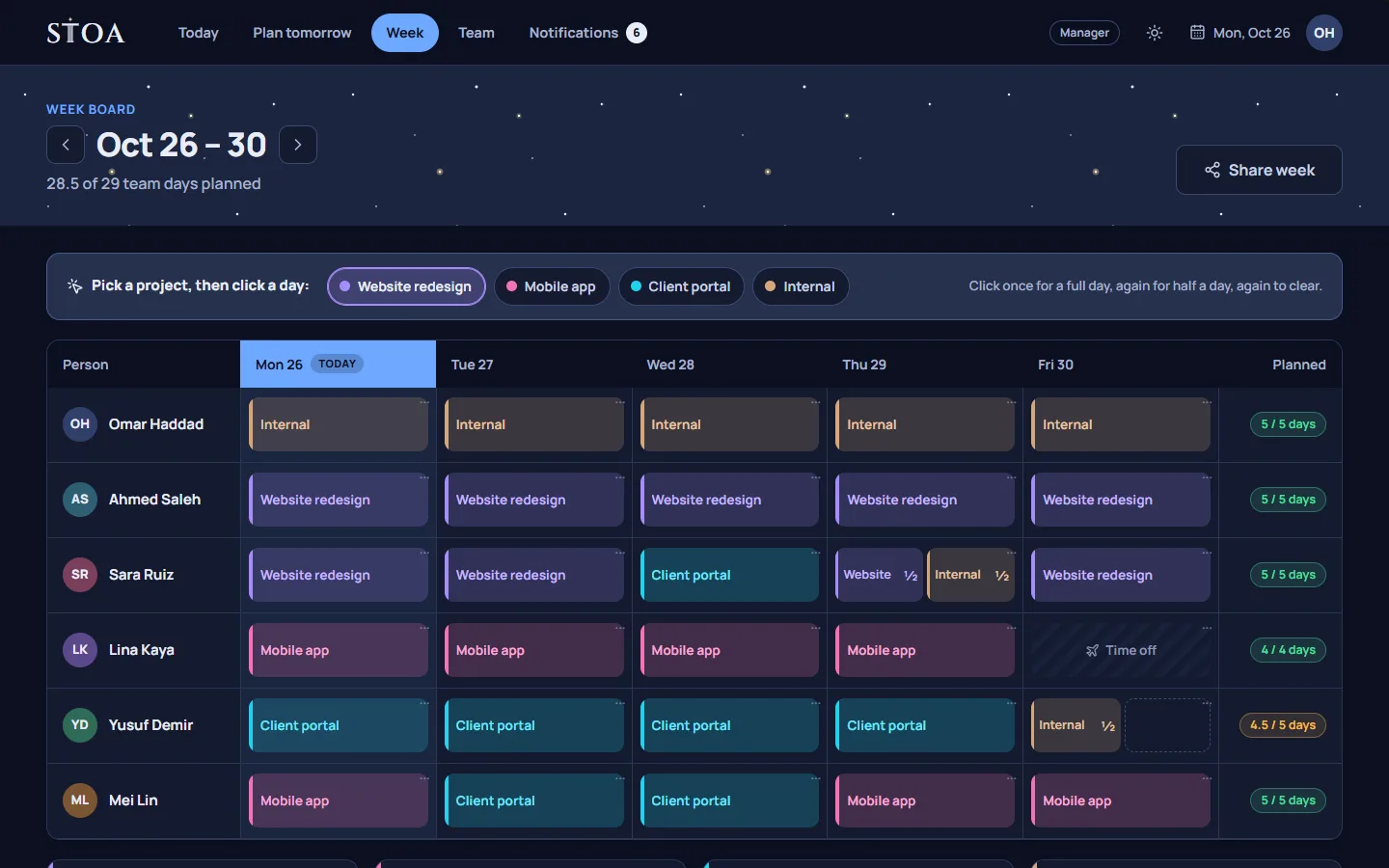
The week board places people on projects by full or half days. It shows time off and team holidays, so a manager can see at a glance who is free on Thursday without doing hour math.
Why days, not hours
A week planned in hours looks precise and rarely is. Nobody knows on Monday that the client review on Thursday will take exactly two hours and fifteen minutes. What a manager does know is that Maya is on the website project for Monday and Tuesday, and on the brand refresh for the rest of the week, with Friday afternoon kept free.
The week board works at that level. You place a person on a project for a full day or half a day. That is enough to answer the questions a small team asks every week: who is on what, who is overloaded, and who has room for the new request that came in on Tuesday.
How the board is laid out
Each row is a person and each column is a working day. A block on the board is a project for a full or half day. Days off and team holidays are marked on the board, so you do not book someone on the day they are away. Your team’s working days come from Settings, so a team that works Sunday to Thursday sees those days, not a Monday to Friday template.
Managers and group leaders plan the people who report to them. Everyone on the team can read the board, so members know what next week holds before it begins.
From the week to tomorrow
The board is where the week is decided. Tomorrow is where the hours are decided. When someone plans their next day, Stoa pre-fills the plan from the week board: if they are on the website project tomorrow, the plan starts there. They choose the tasks, order them, and estimate hours, and the tomorrow check makes sure the day fits.
This split matters. The manager is not asked to guess hours a week ahead, and the person doing the work is not asked to guess the whole week. Each plans what they can see clearly.
A typical week
- Friday afternoon or Monday morning: the manager fills next week’s board. Projects with a deadline go first, then ongoing work, then the half days kept for support and small requests.
- During the week: when a new request arrives, the board shows who has a half day free. Changing a block takes a moment, not a meeting.
- Every evening: each person turns tomorrow’s blocks into a short list of tasks.
- End of day: unfinished tasks can go back to the week, so they show up when the board is planned again.
Sharing the week with people outside the team
Sometimes a client or a partner wants to know when your team is working on their project. Stoa can create a read-only link to the week. It shows who is on which project on which day, without task titles or hours, so you can share the shape of the week without sharing the details. You can also subscribe to a calendar feed in any calendar app that reads ICS.
Bringing your work in
If your projects and tasks live in Trello, Asana, or a spreadsheet today, you can import them from a CSV file. There is also a demo workspace with a sample team, so you can try the board before you set anything up.
What the board does not do
Stoa is not a resource management suite. It does not track project budgets, bill rates, or utilisation reports. If your main question is whether a project is profitable, a dedicated resource management tool will serve you better; our comparison with Float covers that honestly. If your main question is who does what tomorrow, the board and the evening plan are built for exactly that. See pricing for the team sizes each plan covers.
Plan tomorrow tonight, starting this week.
14 days free, no card needed. One price covers the whole team, from 2 to 30 people.