Feature · Team plans
See everyone’s tomorrow on one screen before the team goes home.
Team tomorrow shows your own plan beside the plans of the people who report to you. Suggestions, notes, and overtime all live in the same place, so a leader can line up tomorrow in a few minutes.
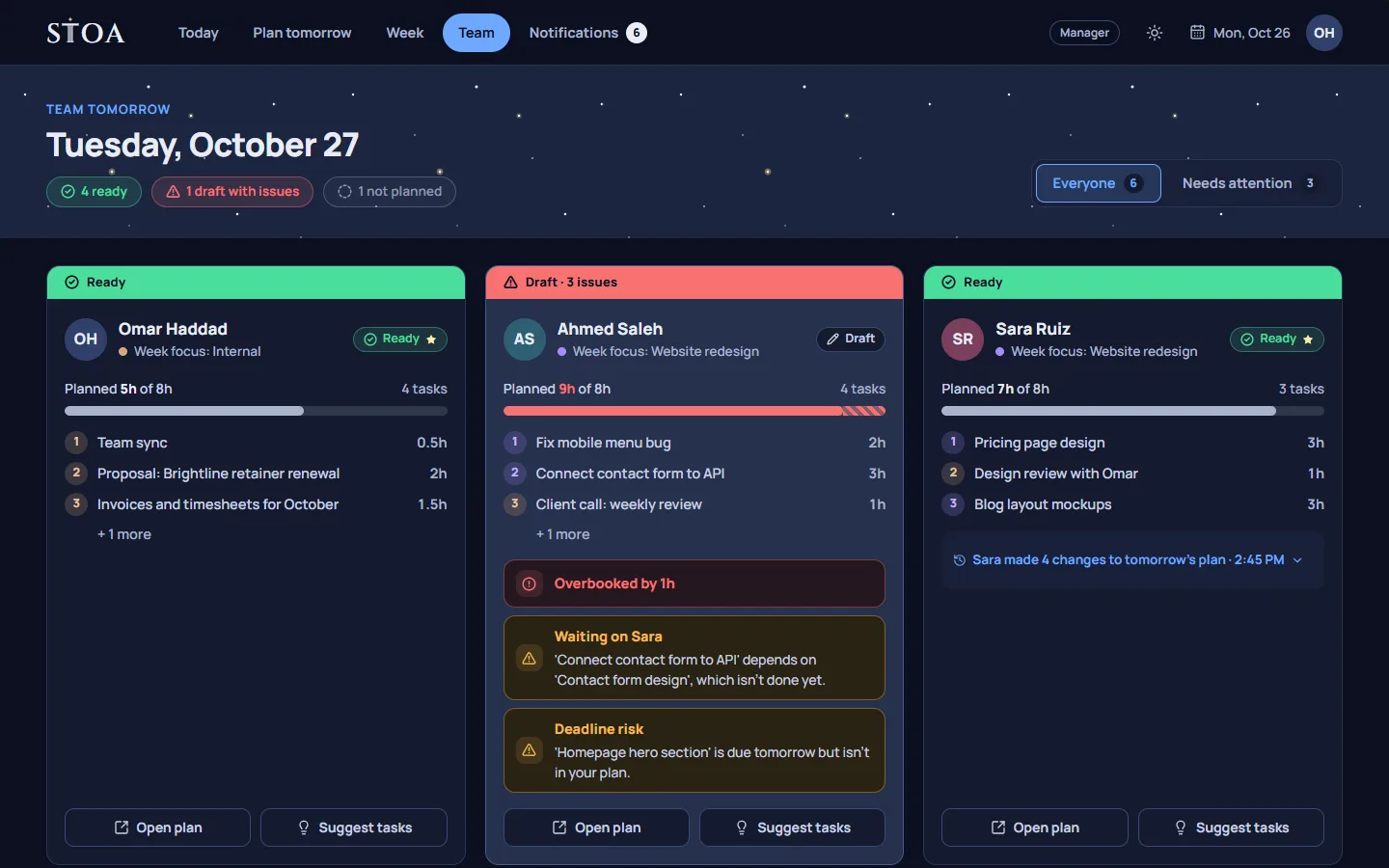
One view for the next day
A leader’s evening question is simple: is tomorrow going to work? Answering it usually means asking people in chat, opening several boards, or waiting for the stand-up. Team tomorrow puts the answer on one screen. Your own plan is the first card. After it comes a card for each person who reports to you, with their tasks in order, their planned hours, and any warning from the tomorrow check.
Because everyone plans in the same place, the cards line up. You can see that the review Sam needs from Ahmed is planned for the morning, and that Ahmed’s morning is already full.
Suggestions, not orders
A manager can suggest tasks for someone’s next day and add a short note explaining why. The suggestion appears in that person’s plan as a starting point. They can keep it, move it, replace it, or say they can’t take it, with a short note explaining why. The manager hears back in Notifications.
This keeps the person who does the work in charge of their own day, while the manager still has a clear way to say what matters. It replaces the long chat thread that starts with “could you also look at…” at 5:45 PM.
Roles and who sees what
Stoa has four roles:
- Owner: sets up the team, manages billing, and plans their own day too.
- Manager: plans the week for their people and sees their plans for tomorrow.
- Group leader: leads a smaller group inside the team and sees the people who report to them.
- Member: plans their own day and can read the team’s week and plans.
Everyone has a leader, so each person’s plan is visible to the people they report to. People join through a personal invite link that the owner or a manager shares. Stoa does not send email, so links go out through whatever channel your team already uses. You can also add placeholders for people who have not joined yet; they count toward your plan’s team size.
Overtime that is seen
When someone works longer than planned, they record the extra hours as overtime in their end-of-day review. The overtime goes up the leader chain to be acknowledged. It is not a payroll system and it does not calculate pay; it makes sure the extra hours are visible to the people who should know about them, instead of disappearing into a long week.
Notifications in two kinds
Updates appear inside Stoa, in Notifications. They are split into two groups: Needs attention, such as overtime to acknowledge or a plan with a problem, and For your information, such as a teammate changing tomorrow’s plan. You can filter and group them, so a busy evening does not bury the one thing that needs an answer.
A leader’s ten minutes, step by step
- Check who has planned. Anyone who has not planned tomorrow yet is flagged, so you know who to remind before they leave.
- Read the warnings first. A card with a problem from the tomorrow check, such as an overbooked day or a task waiting on someone, is where your time is best spent.
- Line up the handoffs. If one person’s first task depends on another person’s work, make sure that work is early in the other person’s day.
- Suggest, then leave it. Send a suggestion with a short note where it helps, and let people answer it in their own plan.
Hours from the plan, not a timer
At the end of each day, a person confirms what happened to their plan. Those confirmed hours are the record. There is no stopwatch to start and no timesheet to fill in on Friday. People keep their actual working rhythm private; the team sees the plan and the result.
Team plans are part of every Stoa plan, from two people to thirty. The pricing page shows the team sizes and prices.
Plan tomorrow tonight, starting this week.
14 days free, no card needed. One price covers the whole team, from 2 to 30 people.