Task boardsMicrosoft Planner, Trello, Asana
What needs doing.
Named after the Stoics, who ended each day by preparing for the next.
Your team starts every morning knowing exactly what to do, with problems caught the evening before.
14 days free. No card needed.
How it works
Managers place people on projects by full or half days. No hour math.
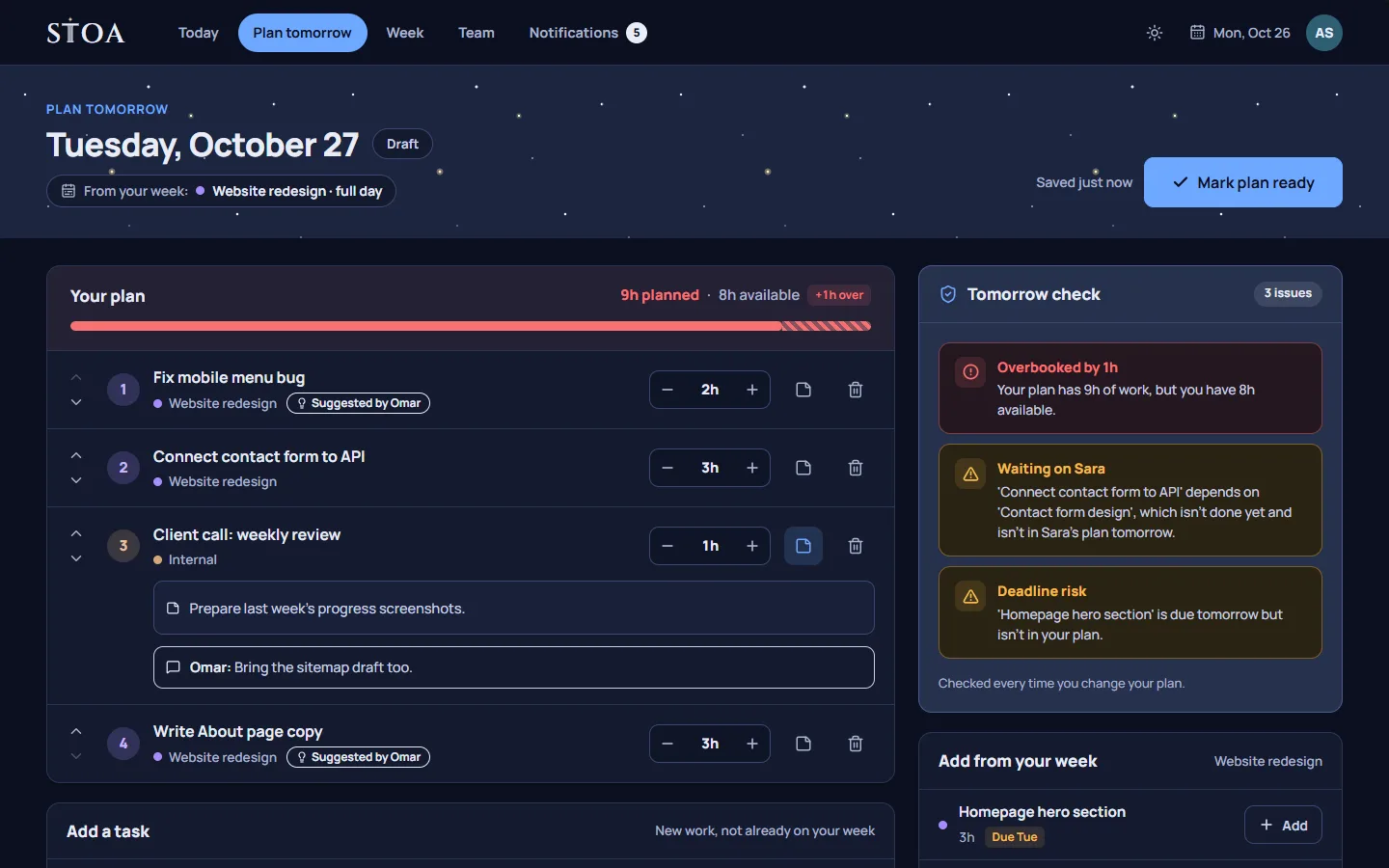
Each person’s day is prefilled from the week and their manager’s suggestions.
The tomorrow check flags overbooking, blocked work, and deadline risks.
Not another task board
What needs doing.
What already happened.
What tomorrow looks like, and whether it works.
Keep your task board. Stoa adds the daily planning layer it’s missing: a realistic plan for each person, checked the evening before.
Why teams use Stoa
Before anyone leaves, Stoa checks tomorrow for too many hours, work waiting on someone else, and tasks about to miss their due date.
Managers suggest tasks. Employees adjust their own day and add a note saying why.
Everyone sees the team’s plans for tomorrow, so handoffs and reviews line up.
Extra hours are recorded at the end of the day and acknowledged by the manager.
Look closer at the tomorrow check, the week board, and team plans for tomorrow.
Who it’s for
A small team, with a real day tomorrow, not another board to manage.
Client work moves around. Before anyone leaves, each person plans tomorrow, so the morning starts with a day instead of a scramble.
The week says who is on which project. Each person turns that into tomorrow’s tasks, and the problems show up the evening before.
A studio day is pieces of work, not a pile of tickets. People plan the next day before they leave, and the plan has to fit.
If the whole team is small enough that one evening can set tomorrow, this is for you. The owner plans their day too.
Read how Stoa fits small agencies, software teams, and design studios. Comparing tools? See Stoa and Float or Stoa and Sunsama, or start with the guide on how to plan tomorrow for your team.
No timers, no screenshots, no activity tracking. Your actual hours stay private to you.
Pricing
$9.99/month
Billed monthly
Up to 2 people
$24.99/month
Billed monthly
Up to 6 people
$34.99/month
Billed monthly
Up to 10 people
$49/month
Billed monthly
Up to 15 people
$89/month
Billed monthly
Up to 30 people
One price for your whole team, not per person. Every plan includes a 14-day trial. Launch pricing. The first 50 teams keep their price for life.
FAQ
No. Stoa plans the work. It never measures how long people work: no timers, no screenshots, no activity tracking.
Yes. Suggestions are a starting point. An employee can move, drop, or replace a suggested task and adds a short note explaining why.
People report overtime at the end of the day, their manager acknowledges it, and pay stays in your own payroll system.
No. Everything happens inside Stoa. Invites are a link you share yourself, and updates appear in Notifications.
Yes. Set your team’s work days and hours in Settings, and every plan and check follows them.
Starter includes 2 people, Small 6, Studio 10, Team 15, and Growing 30. Everyone on the team plans their day, including managers.
Annual is ten months’ price for the year: $99.90, $249.90, $349.90, $490, or $890.
Yes. Every plan starts with a 14-day trial. No card is required until you keep the team.
It is the daily plan for a team that has projects. Tasks sit on tomorrow, with the person who will do them. It is not a board you manage all day.
Hours that count come from the plan a person confirmed. There is no timer, no punch clock, and no timesheet to fill in afterwards.
Those tools hold your list of work. Stoa turns it into each person’s realistic plan for tomorrow and catches problems the evening before. Stoa works alongside them.